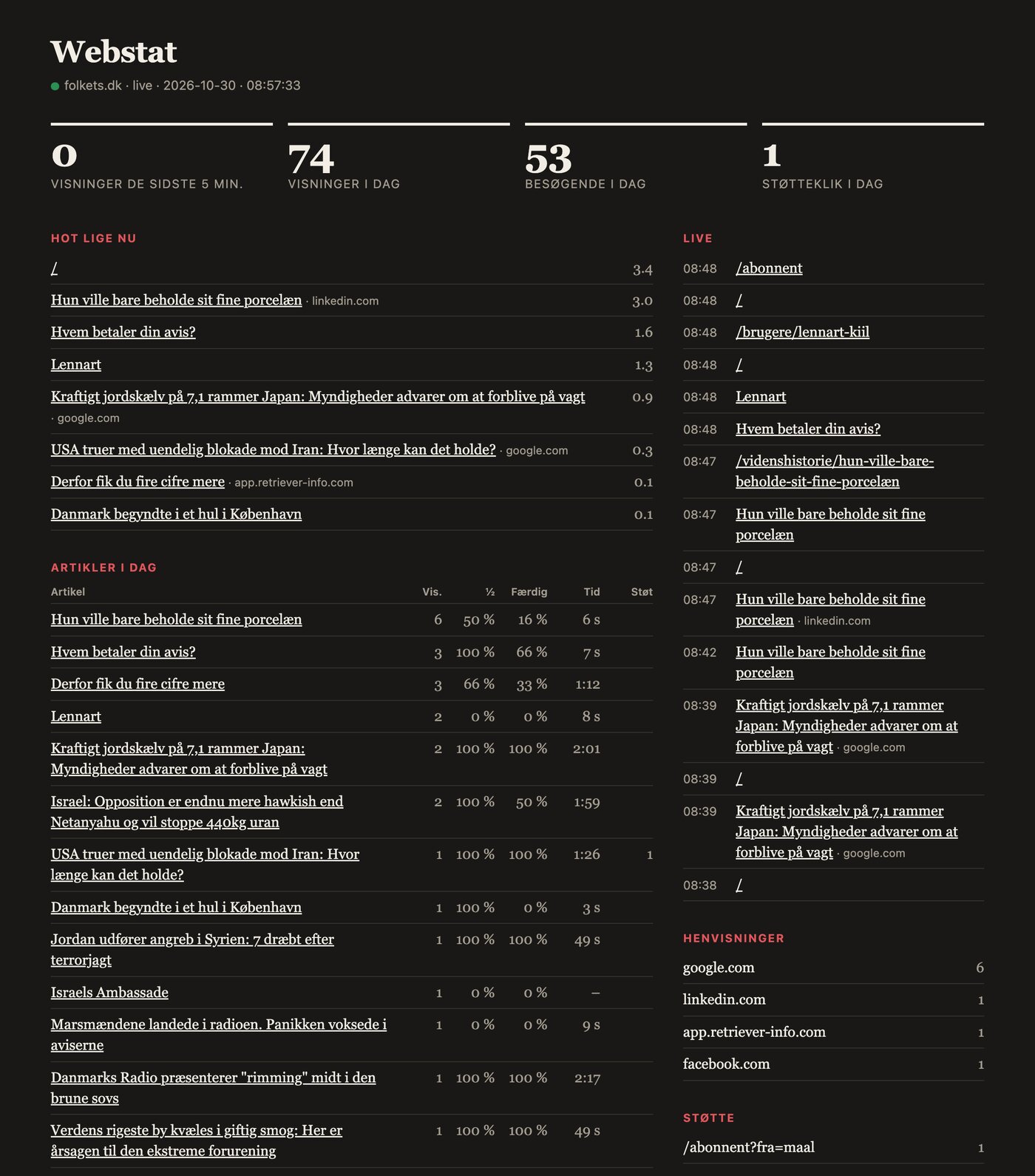
Last night, I built my own web analytics for Folkets Avis. It shows in real-time what readers are reading, how far they get, and if they click "Support." It stores no IP addresses, sets no cookies, and it's tailored precisely to my own media. I've been waiting for this for years.
It's just past midnight. An article about a woman who just wanted to keep her fine china appears in a live feed on my screen. A second later, another one. Then a reader comes in from Infomedia's media monitoring. It's the first time I've seen Folkets Avis being read as it happens.
I've used Google Analytics for many years because everyone does. And I've never liked it. It's clunky, it sends my readers' behavior to Google, it requires a cookie banner, and when I finally open it, I have to go through five menus to find out which article was read yesterday. It's built for a webshop with a marketing budget, not for a small newspaper.
Now I have something built specifically for my newspaper. It took one evening.
What the dashboard shows
At the top, four numbers: views in the last five minutes, views today, visitors today, and support clicks today. Below them:
- Hot right now: the articles that are gaining traction and where readers are coming from.
- Articles today: views, how many reached halfway, how many finished reading, how long ago they were active, and how many clicked through to support the newspaper.
- Live: every single page view, with the time, the moment it happens.
- Referrers, devices, browsers, and an overview of the preceding days.
It's the "Finished" column that makes me happy. Google Analytics can tell me an article was opened. It can't easily tell me if anyone read it. Webstat can. When half of the article's body text has been on the screen, a signal is sent. When 95 percent has, another one is sent. This morning, I could see that two out of three who opened "Who is paying for your newspaper?" read it to the very end. That's a number an editor can use.
And then the "Support" column. Folkets Avis lives off readers who choose to support it. Now I can see which article prompted someone to click. I've never been able to do that before.
The building blocks
Four things make this possible, and none of them are large.
xs (cross.stream) is an event stream. Each page view, each reading depth, each click is saved as a small event with a topic like webstat.folkets.pageview and facts in a field next to it. Nothing is overwritten. Everything can be replayed from the first event.
http-nu is a web server where all handling is written in Nushell. One script, serve.nu, receives the events, draws the dashboard, and streams it out.
SSE (Server-Sent Events) is the old, boring, and completely underestimated way to let a server push data to a browser. One connection that stays open. No WebSockets, no polling.
Datastar is a small JavaScript library that receives HTML over SSE and inserts it onto the page. The server draws, the browser displays. There's no React, no build steps, and no client logic to maintain.
The most beautiful part is how little code it takes to make it all live. Here's the entire route that keeps the dashboard updated:
(route {method: "GET", path: "/updates"} {|req ctx|
  .cat --follow --new -T "webstat-stats.out"
  | each {|f| board | to datastar-patch-elements }
  | prepend (board | to datastar-patch-elements)
  | to sse
})
Read aloud: Follow the stream. Every time new numbers arrive, draw the board and send it. Start by sending the board as it looks right now. That's all there is to it. On the page, it says data-init="@get('/updates')", and then Datastar takes care of the rest.
A processor that calculates
Between the raw events and the dashboard sits a processor: a small Nushell program that xs runs every time a new event arrives. It sums up the numbers for the day, keeps track of reading depth and time per article, and rolls the day over into the history at midnight. It writes the result as a single event, webstat-stats.out, and that's what the dashboard listens for.
This means the dashboard never calculates. It reads one finished result. And because the processor starts from the first event, I can change how the numbers are calculated and have the entire history recalculated without losing anything.
"Hot right now" is calculated in a way I'm quite proud of. Each view in the last hour counts, but it weighs less the older it is. The half-life is fifteen minutes. An article that got ten views half an hour ago therefore weighs less than one that got five within the last five minutes. The list cools down on its own, even when nothing is happening.
The same list is now on the front page of folkets.dk as "Hot right now," so readers can see what others are reading at this moment. And when an article crosses a threshold, I get a notification on my phone via ntfy: "Gaining traction: …," with the most important referrer and a link. At seven every morning, a report about yesterday arrives. Neither of these needed to be purchased as an add-on.
Privacy first, and that's not a cliché
That was the most important requirement. I don't want to know who my readers are. I want to know what they are reading.
Here's how it's set up:
- No cookies, nothing stored on the reader's device. Each page view gets a random ID that lives as long as the page is open, and then it's gone.
- No IP addresses stored. Visitors are counted as a hash of IP address, browser, and a salt. The salt resides only in the server's memory and is changed daily. Therefore, a reader can be counted once today, but never followed from one day to the next. Even I can't.
- Broad categories. Browser and operating system become "Chrome" and "iOS," not a full user agent. The screen becomes mobile, tablet, or computer.
- No third parties. Data is not sent to Google, Meta, or anyone else. It resides in one event stream that I own.
- Bots don't count. Crawlers, pre-loaders, and language model scrapers are filtered out before anything is saved.
This also means the numbers are more honest. Google Analytics only sees readers who have agreed to cookies and don't use an ad blocker. Webstat sees them all.
The small PHP file that makes the difference
One detail is worth highlighting because it solves two problems at once.
The script in the reader's browser doesn't send directly to webstat. It sends to /nyt.php on folkets.dk itself. This is a regular PHP file of about a hundred lines that responds to the reader immediately and then forwards the event to webstat along with a secret key.
The first problem it solves is ad blockers. They block requests to external domains, but they leave a site's own requests alone. The second is the IP address. Webstat runs behind two layers of proxy at cross.stream, and the reader's address doesn't get through there. It does at folkets.dk, where Cloudflare forwards it. The PHP file sends the address to webstat, which hashes it and forgets it. Only a request with the correct key is allowed to provide an IP address.
The file times out after one second if webstat doesn't respond. A crash in the statistics should never slow down the newspaper.
Tailored to my own media
This is the part a standard solution can never give me.
The script knows Drupal. It reads the node ID and content type, the article's headline, and the body text field. Therefore, it can measure reading depth within the article itself and not in the footer. Therefore, the dashboard can show headlines instead of URLs. And therefore, I can see if it's a knowledge story, a news item, or a commentary that's being read.
It knows what "support" means at Folkets Avis: a click on /abonnent, /stot, or a link to Stripe. It knows which article the reader came from when they landed on the subscription page. This is precisely the question I've been asking myself for years: Which articles make people pay?
And when I come up with a new question tomorrow, it's a line in the processor. The events are already there.
What it means for your business
I'm writing this with enthusiasm because it was fun. But there's a point that extends beyond a small newspaper.
- Standard tools are built for the average. Google Analytics answers the questions Google thinks most people ask. If your most important questions are your own, a small, custom-built tool can be both cheaper and better.
- It has become cheap to build yourself. I built this in one evening with the help of an AI assistant. Two years ago, it would have been a project taking several weeks. The threshold for when it pays to build rather than buy has moved significantly.
- Privacy can be a design choice from the start. It's much easier to not store an IP address than to delete it afterward. And data you've never stored can't leak.
- Ownership of data is a strategic advantage. My numbers are in an event stream that I own, in a format I can read with a single command. They won't disappear when a vendor changes its terms.
I haven't shut down Google Analytics yet. I want to see the two side-by-side for a while. But I already know which one I'll be opening in the morning.