With one command in Nushell, you can view your knowledge base from the outside — and discover things you didn't know you didn't know.
It's all about overview.
I discovered something new today. Not in a note, not in a meeting — but in a terminal window.
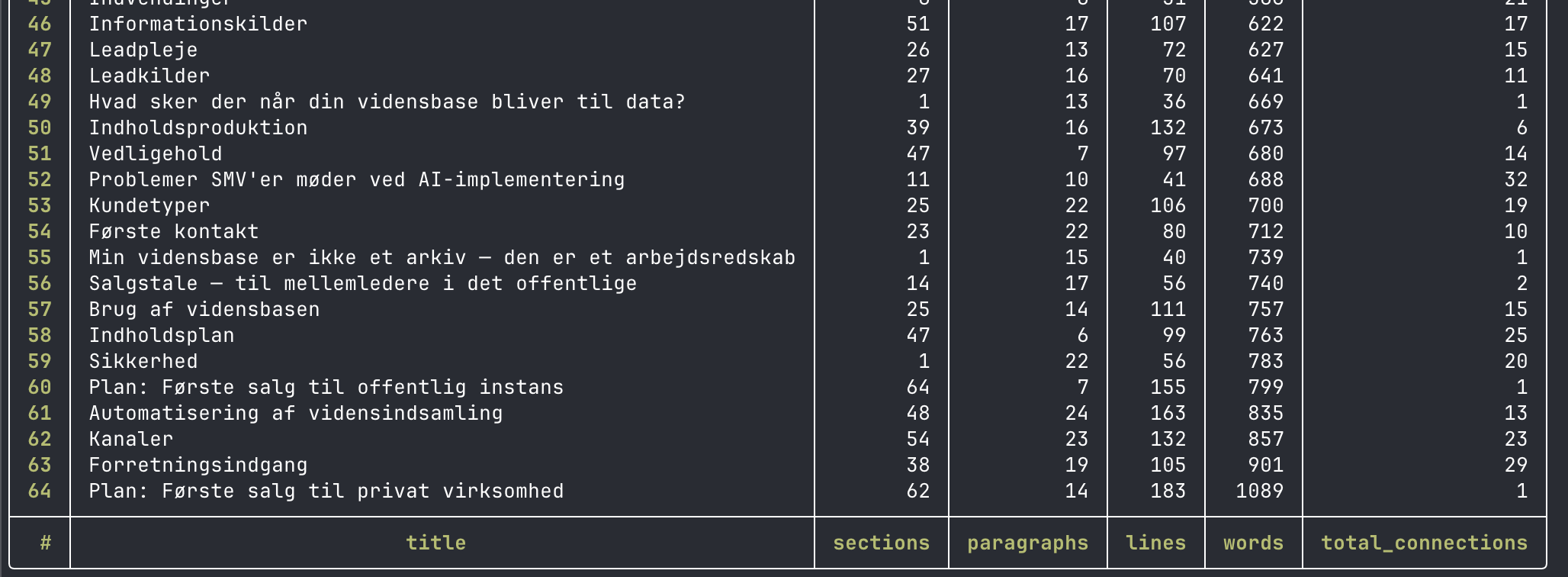
I ran a single command: iwe stats --format csv | from csv. That's Nushell syntax, and what it does is ask IWE for statistics on all notes in the knowledge base and convert the output into a structured table that Nushell understands and can work with. From there, you can sort, filter, and query the data just as you would with a database.
That sounds technical. It is, a bit. But what I found wasn't technical at all.
The note that the rest of my knowledge base refers to the most is called Problems SMEs face with AI implementation. It has 32 incoming references — meaning 32 other notes point to it. That didn't surprise me. It's a central note, and I know I use it a lot. But when I sorted by word count, I got a different picture: the note on Use cases is cited 16 times from the rest of the base, but contains only 172 words. Section by section, it's almost a skeleton. Everyone points to it. No one has fleshed it out.
These are precisely the kinds of things you don't discover by reading your notes. You discover them by seeing them as data.
There was more. When I filtered for notes with no connections at all — neither incoming nor outgoing — four popped up that shouldn't be there: a sales pitch for public sector middle managers, two sales plans, and a note on process-driven leadership. All four are well-filled, thoughtful notes. And all four float freely in the knowledge base without being connected to anything. They exist, but they don't function. A note that isn't linked is a note no one finds — not even an AI system traversing the graph to build context.
This is a design flaw, not a content flaw.
What's interesting about this approach is what it actually reveals: a knowledge base has a structure, and you can measure that structure. Which notes are gravitational centers — those around which everything else orbits? Which are thin but heavily used, and therefore urgent to expand? Which are orphaned islands that should be connected? These are questions you can normally only answer by sitting with the entire collection and reviewing it manually. With iwe stats and Nushell, it takes ten seconds.
Nushell is an unusually good match in this context. It's a modern shell that treats all output as structured data rather than raw text. Where a traditional shell would give you a string of characters you have to parse yourself, Nushell gives you a table you can query. This means the line between "terminal" and "data analysis" becomes very, very thin — and that a tool like IWE, which can export in CSV, can suddenly be used for things it was never explicitly designed for.
I end up with two things on my list today. One is to properly write out use-cases — it's obviously a note that deserves more than it has received. The other is to link the four orphaned notes into the MOCs they belong in, so they start functioning instead of just existing.
Both tasks would have remained undiscovered if I hadn't asked the knowledge base what it knew itself.
This is probably the best description of what this workflow is really about: not using AI to do things for you, but building systems that show you what you still need to do yourself.
Find out more about Nushell: nushell/nushell: A new type of shell
And learn about IWE: iwe-org/iwe: Markdown memory system for you and your AI agent
We help companies think systematically about knowledge, AI, and what it actually takes for the two to work together. If that sounds relevant — get in touch with me.